
Magento AEO Expert for Magento 2 and Adobe Commerce
Magento gives you deep control and a large crawl surface. A Magento AEO expert cuts the crawl waste, fixes the markup your theme prints and makes sure AI crawlers get past your CDN to the product pages that matter.
- robots.txt and sitemap settings configured in the Admin
- Layered navigation URLs kept out of the crawl
- Product markup checked on Luma, Hyvä or headless
What a Magento AEO Expert Does
A Magento AEO expert makes a Magento 2 or Adobe Commerce store easy for AI answer engines to crawl, understand and cite. Magento's strength is control: multi-store scopes, layered navigation, custom attributes and full access to code. Its weakness for AEO is the same thing. A default catalog can generate far more URLs than it has products, and crawlers spend their time in filter combinations instead of on the pages buyers ask about.
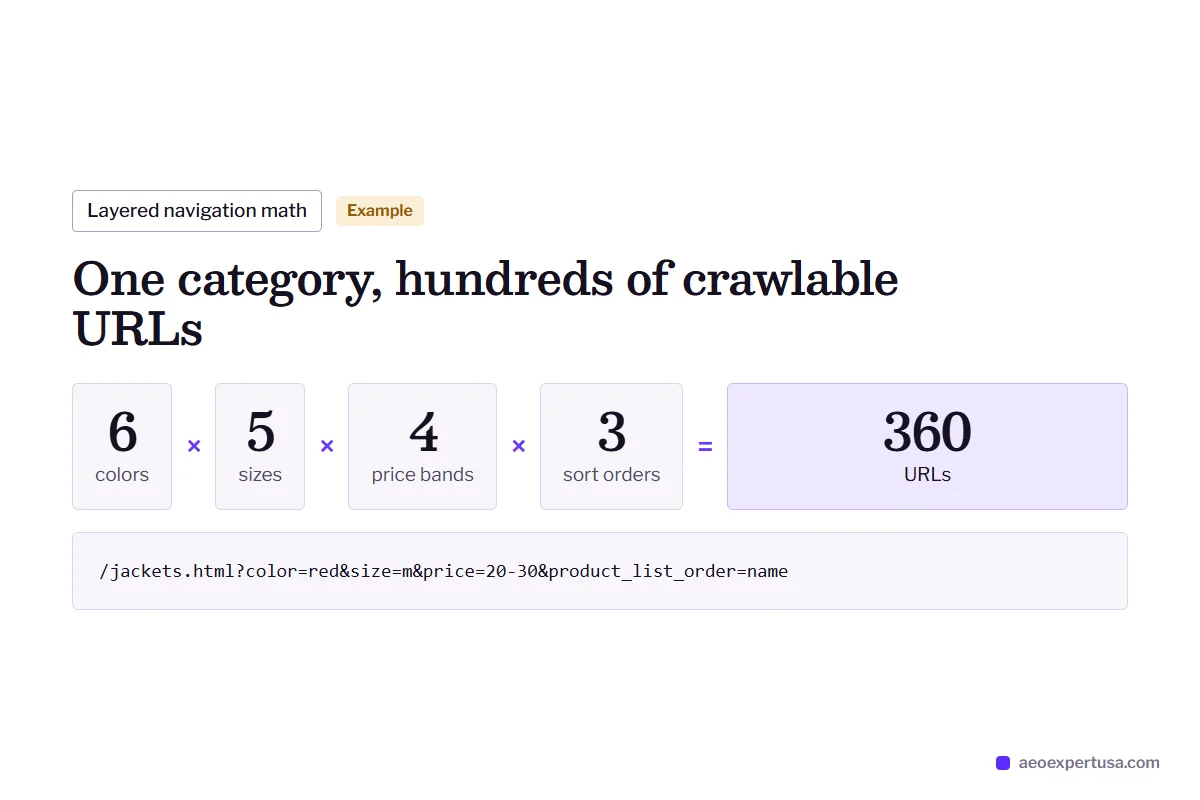
AI engines depend on crawling. Google AI Overviews and AI Mode draw on Googlebot and Google's index, Bingbot feeds Microsoft Copilot and Bing answers, and ChatGPT search relies on OAI-SearchBot. If those crawlers are busy with ?color=red&size=m&price=20-30, your best product and guide pages get crawled less often and refreshed less often.
Magento work is part of ecommerce AEO and technical AEO, and it starts with a free AEO audit.

Magento AEO Expert Checks in the Admin and Code
Where Magento stores lose AI visibility, and where each setting lives.
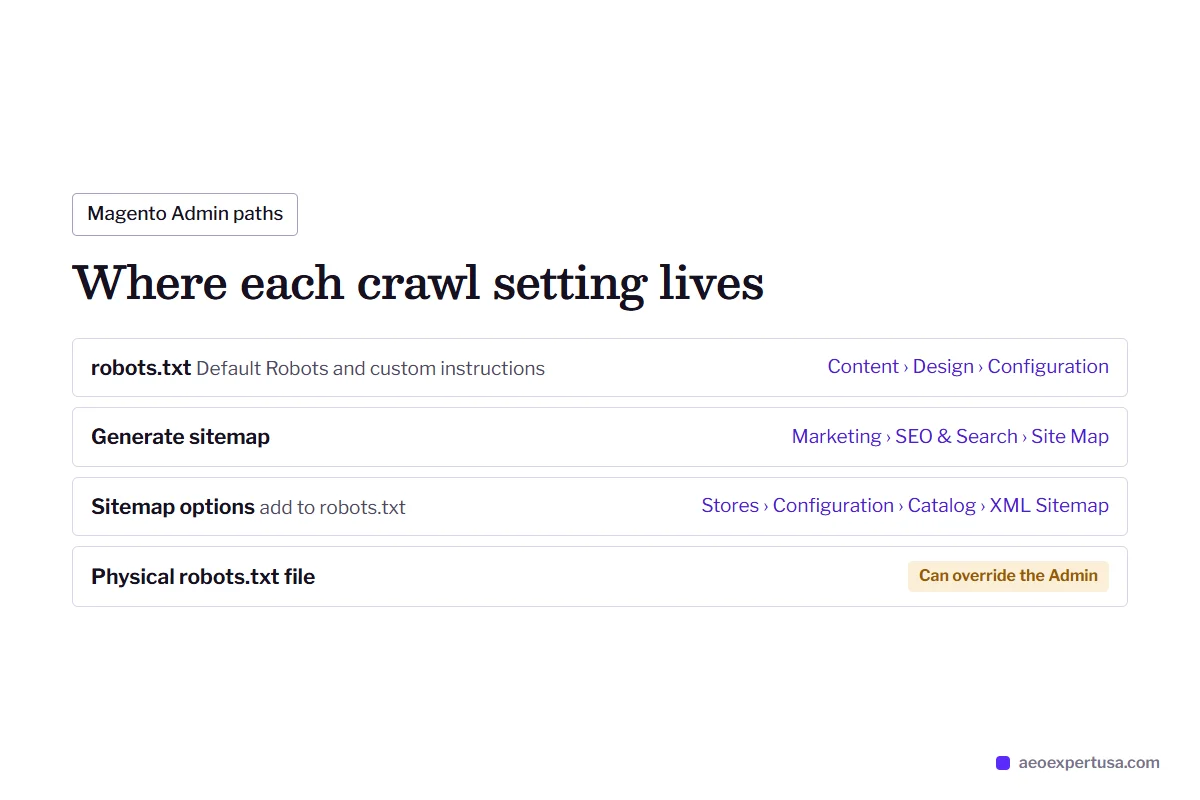
robots.txt in the Admin
Magento builds robots.txt from Content, Design, Configuration, in the Search Engine Robots section, where you set Default Robots and add custom instructions per scope. A physical robots.txt file on the server can override it, and a rule copied from an old forum post can block more than intended.
XML sitemap
Sitemaps are generated under Marketing, SEO & Search, Site Map, with options under Stores, Configuration, Catalog, XML Sitemap, including adding the sitemap to robots.txt. The audit checks it regenerates on schedule and lists only canonical, indexable URLs.
Layered navigation
Filter and sort parameters create near-endless URL combinations. Robots rules, canonical tags and noindex settings, chosen per filter, keep crawlers on the URLs that answer real searches.
Theme markup
Luma prints schema.org microdata in the product template, and many extensions add JSON-LD on top. Hyvä and custom themes vary. The goal is one complete Product entity per page, matched to the visible price and stock.
Adobe Commerce Cloud
On cloud infrastructure, Fastly sits in front of the store, and search engine indexing is switched off on non-production environments. If indexing is disabled for an environment, your custom robots.txt instructions are not served at all.
Headless and PWA
PWA Studio and other headless front ends build pages with JavaScript. Without working server-side rendering, many AI crawlers see an empty shell. The audit fetches key templates as a non-rendering crawler to check.

Magento AEO Expert Fix: Layered Navigation Crawl Waste
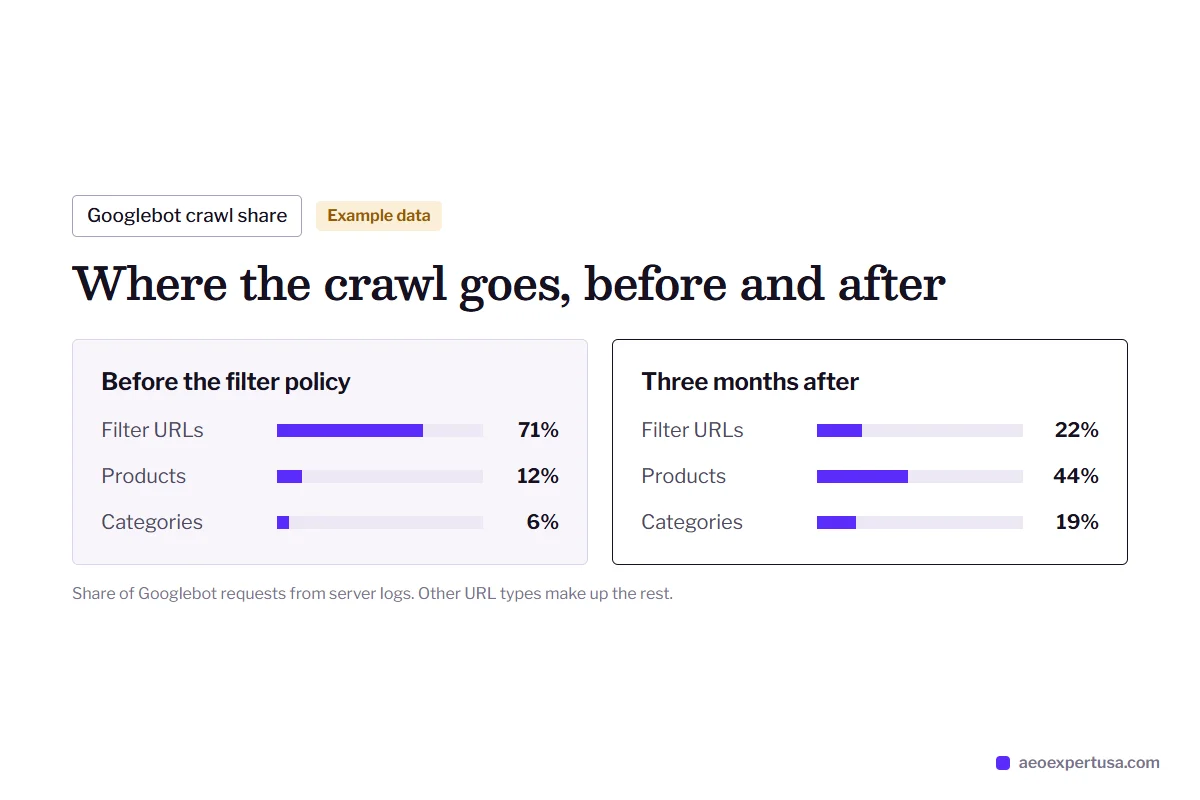
Server logs show Googlebot and Bingbot spending most of their requests on filter URLs that nobody searches for. Category and product pages wait days for a recrawl, so AI answers draw on stale prices and stock. The fix is a written filter policy, applied in robots instructions, canonicals and navigation settings.
- Found in server logs and the Search Console Crawl stats report
- Fixed with robots rules, canonicals and filter settings
- Measured by crawl share on product and category URLs

Why Stores Hire a Magento AEO Expert
A typical Magento store
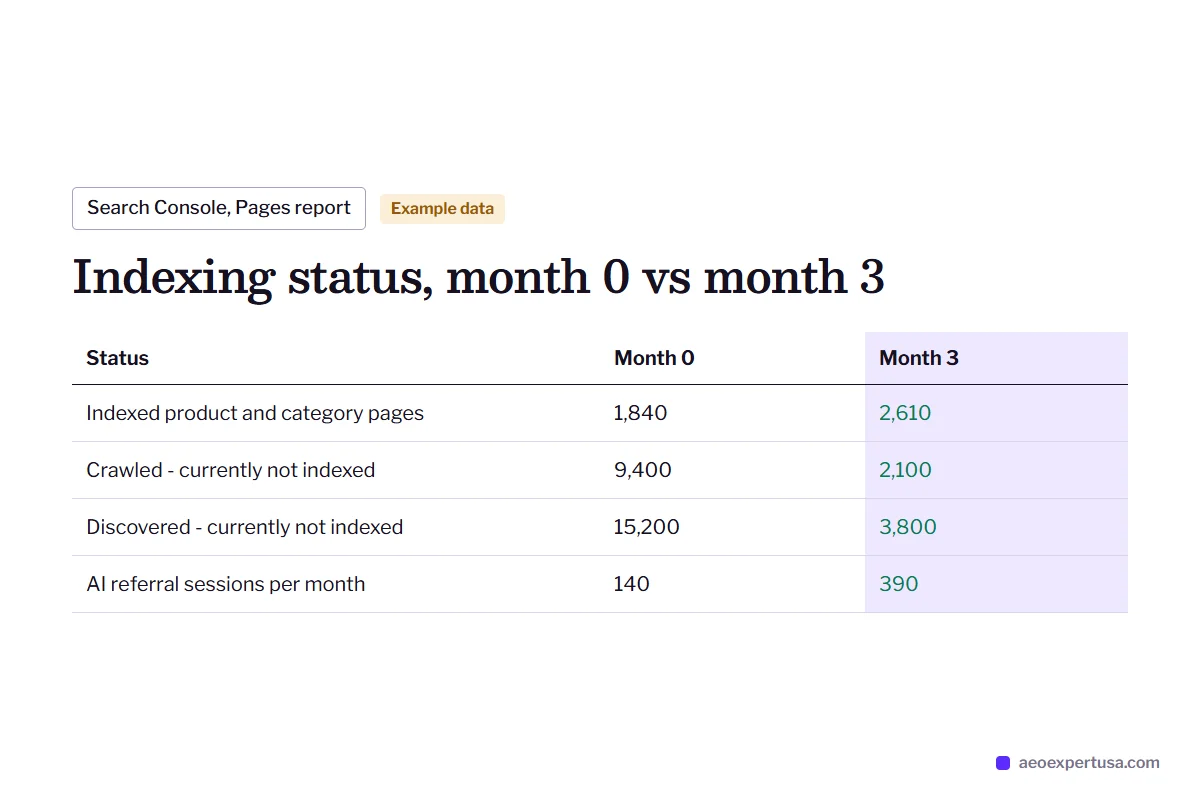
- Thousands of filter URLs sit in Crawled - currently not indexed and Discovered - currently not indexed.
- Product pages carry manufacturer descriptions shared with every other reseller.
- Configurable products hide size and compatibility answers in a dropdown.
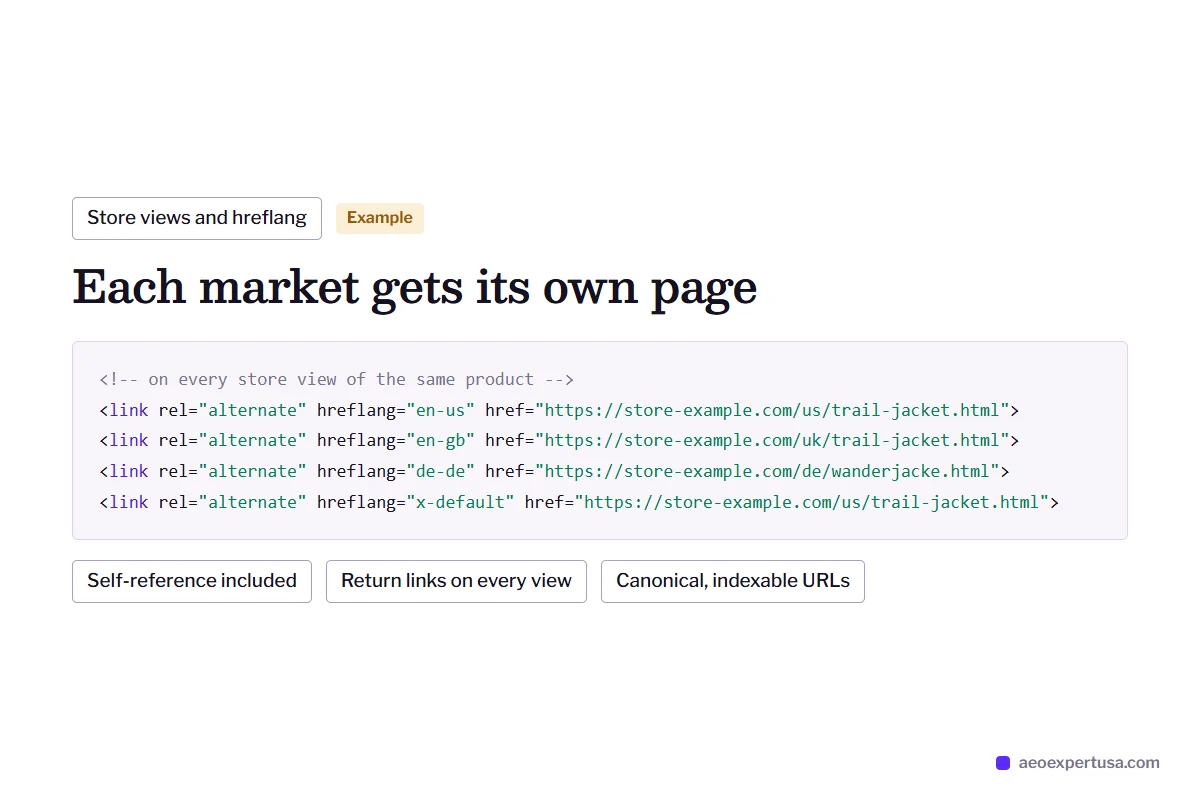
- Store views publish several languages without correct hreflang.
After Magento AEO work
- A filter policy: which attributes earn indexable pages and which stay out of the crawl.
- Unique specs, use cases and answers added to the products that sell most.
- Key variant facts written into visible text and structured data.
- Store views mapped with hreflang so each market gets the right page.

How the Magento AEO Expert Process Works
Audit
Within 48 hoursAdmin settings, robots.txt, sitemaps, theme markup, server logs, Search Console and live tests in each AI engine.
Crawl plan
Week 1A written filter and URL policy your developers can implement, or I implement it for you.
Content and markup fixes
Month to monthAnswer-ready product and category content and complete Product markup, top sellers first.
Measure
MonthlyCrawl share, indexing status, AI referrals and citations tracked every month.

Magento AEO Expert FAQs
Is Magento good for AEO?
Magento is a capable AEO platform because you control every setting and template. The catch is complexity: layered navigation, store views and extensions create crawl and markup problems that hosted platforms never expose. Fixed properly, a Magento store can be as crawlable as any site.
Where is robots.txt in Magento 2?
In the Admin under Content, Design, Configuration. Edit the scope you want, open Search Engine Robots and add rules in the custom instructions field. If a physical robots.txt file exists on the server, it can override the Admin setting.
Can Adobe Commerce Cloud block AI crawlers?
It can, depending on configuration. Fastly and any WAF rules sit in front of the store, and if search engine indexing is disabled for an environment, your custom robots.txt is not served. The audit checks both layers.
Do you work with Hyvä themes?
Yes. Hyvä renders on the server like Luma, which suits AI crawlers. Its markup depends on the theme build and modules you use, so the audit checks the actual product HTML.
Should we go headless for better AI visibility?
Not for AEO reasons. A headless front end adds rendering risk for crawlers that do not run JavaScript. If you are already headless, server-side rendering has to work on every product and category template.
Get a Free Magento AEO Audit
See where crawlers spend their time on your store, what AI engines can read, and the first three fixes.
- Delivered in 48 hours
- Magento 2 and Adobe Commerce
- No obligation
Request your free AEO audit
Takes 30 seconds. You get a real audit, not a sales sequence.
Related services and guides
Make AI recommend your business, starting this week
Hire an AEO expert who works from your data, not guesses.