
Fix AI Visibility Problems That Keep AI Engines From Citing You
Most businesses that never appear in AI answers are not short of content. Something stops AI engines from reaching, reading or trusting their pages. This service finds that cause and fixes it on your site.
- AI crawlers blocked by robots.txt, Cloudflare or a WAF
- Pages that are empty without JavaScript, and broken schema
- Inconsistent brand facts and citations you used to have
What It Means to Fix AI Visibility
To fix AI visibility is to remove the technical and factual problems that stop answer engines from using your pages. ChatGPT, Perplexity, Google AI Overviews, AI Mode, Gemini and Copilot all work from pages their crawlers can fetch and read. If a crawler is refused, sees an empty page, or finds facts about you that disagree with other sources, the engine quietly uses someone else.
These problems rarely announce themselves. A security setting can block AI crawlers for months while your site looks perfect to you in a browser. A JavaScript framework can serve a blank shell to bots that do not run scripts. An old address on a directory can make an AI engine describe your business wrongly.
This is the fixing offer at AEO Expert USA. It usually follows the free AEO audit, which finds the problems, and it is quoted as one fixed-price sprint.

AI Crawlers Blocked: Which Bots Matter for AI Visibility
User agent names as each company publishes them. Blocking some can be a deliberate choice; the problem is blocking the wrong ones by accident.

AI Visibility Fixes This Service Covers
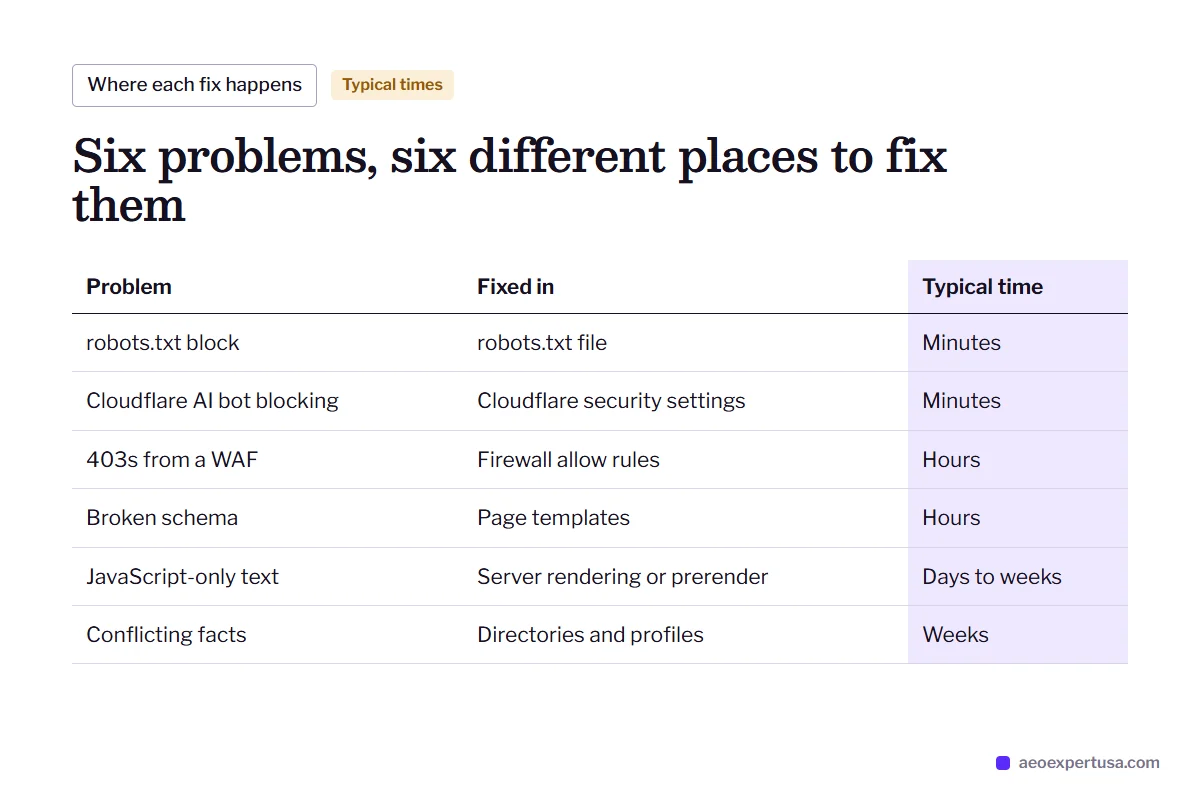
Six problem types, each traced to a specific rule, setting, page or profile.
robots.txt blocks
A Disallow for OAI-SearchBot or PerplexityBot copied from a template, or a blanket User-agent: * rule that shuts every AI crawler out.
Cloudflare bot settings
AI bot blocking, a managed robots.txt that adds AI disallow lines, or Bot Fight Mode serving challenges to verified crawlers.
WAF and security rules
Firewall rules, rate limits and security plugins that return 403, 429 or a challenge page to bots from data-center IP ranges.
JavaScript rendering
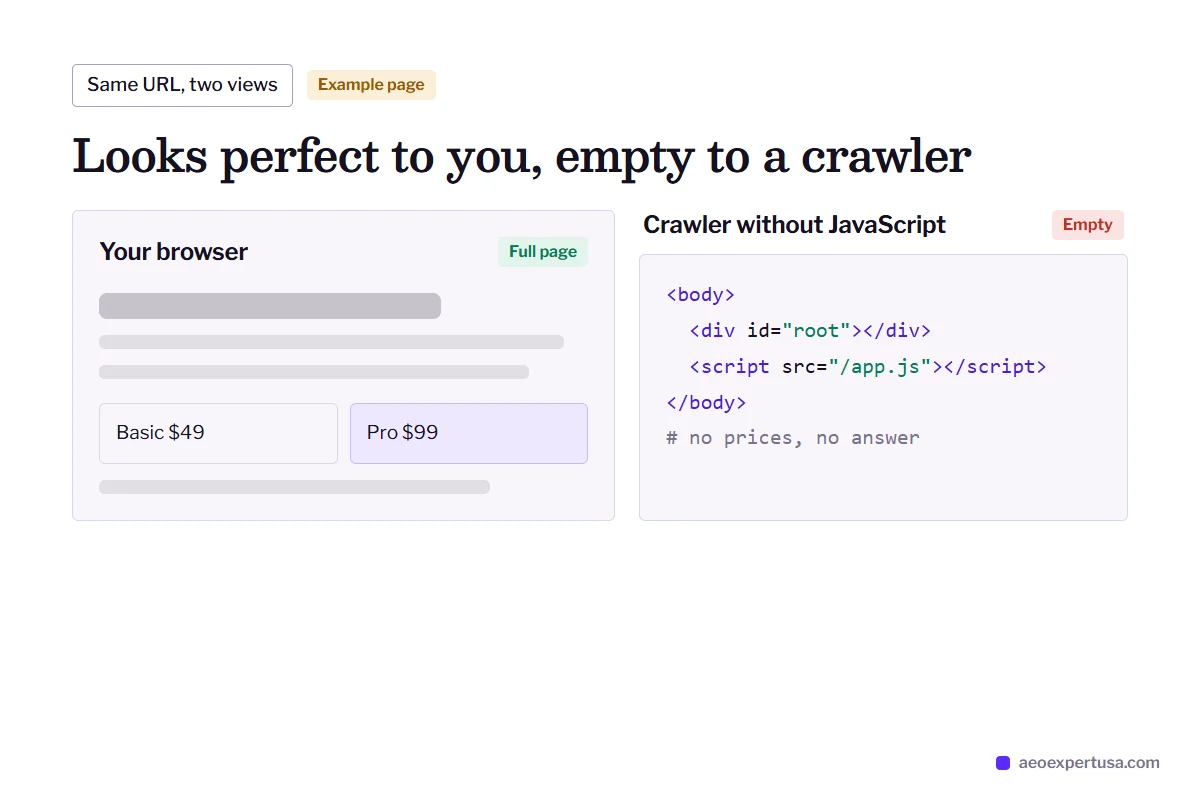
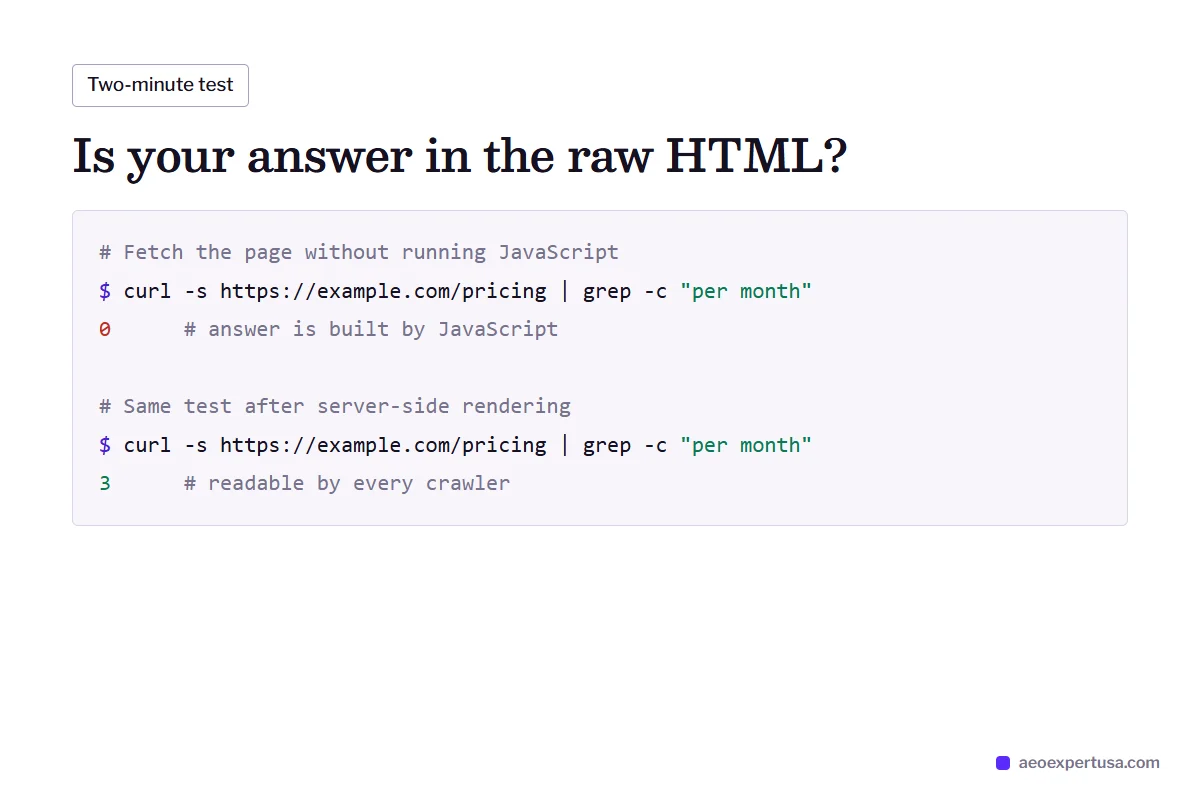
Pages that load their text with JavaScript. Many AI crawlers fetch the raw HTML only, so they see a near-empty page.
Broken or missing schema
Invalid JSON-LD, duplicate Organization nodes, or markup that contradicts what the page says. Fixed and validated against schema.org.
Inconsistent facts and lost citations
Different names, addresses, prices or services across your site and profiles, and pages that were cited before a redesign, redirect or rewrite.
How AI Crawler Access Is Checked Before and After a Fix
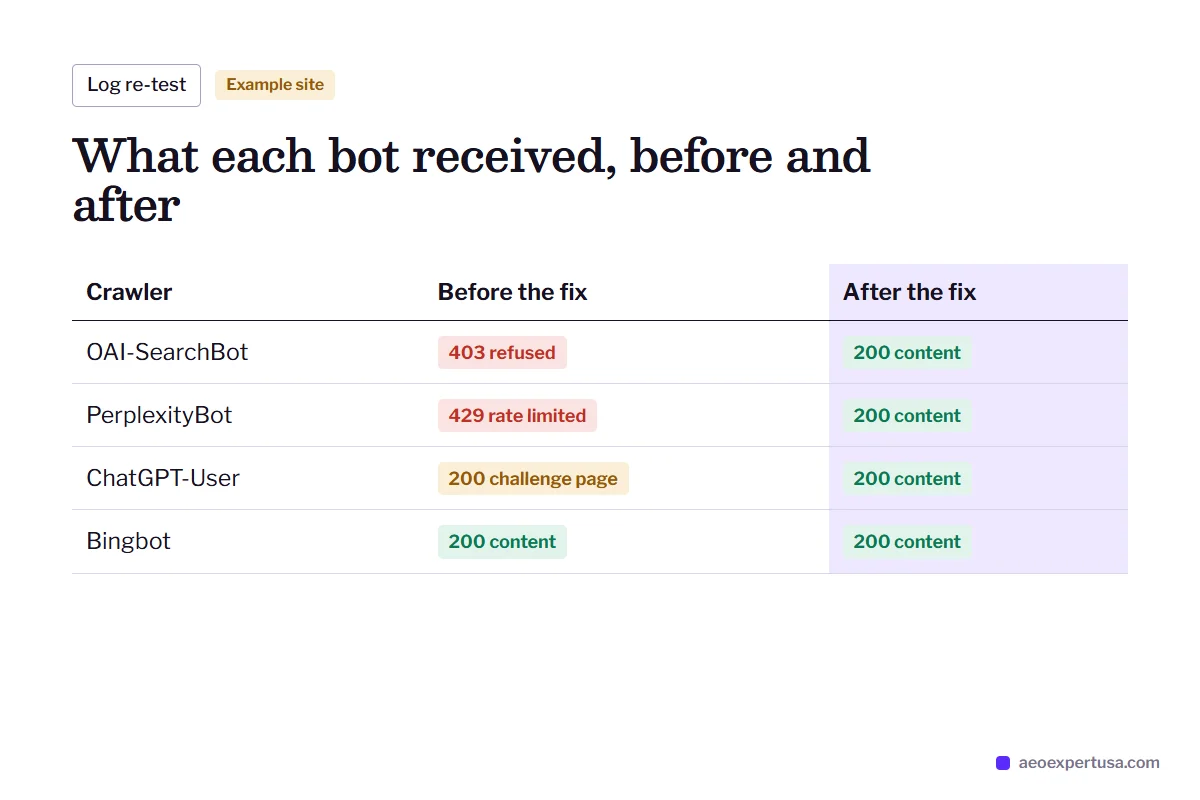
There is no dashboard that warns you when AI crawlers are refused. The evidence lives in your robots.txt file and your server or CDN logs. Each AI visibility fix is checked there first, then re-checked after the change.
- 200 responses mean the bot reached your pages
- 403, 429 or 503 mean a firewall, rate limit or server refused it
- A 200 with a challenge page means the bot got no content
- IP addresses checked against each company's published ranges to rule out fake bots

Google-Extended, JavaScript and Other AI Visibility Myths
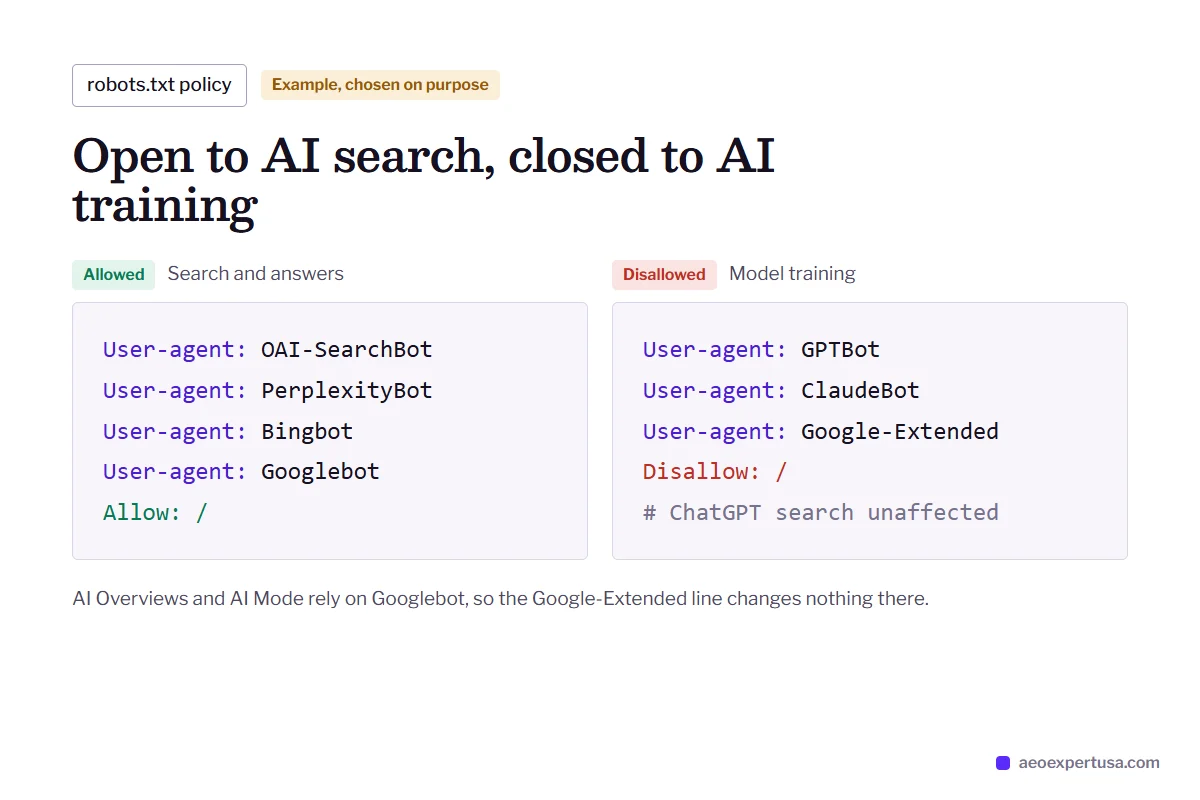
Google-Extended does not control AI Overviews. It is a robots.txt token that decides whether Google may use your content for Gemini model training. Blocking it does not remove you from Google AI Overviews or AI Mode, and allowing it does not get you in. Those features use normal Googlebot crawling and Google's index, so the checks that matter are Googlebot access, indexing and no nosnippet rule.
Blocking GPTBot does not remove you from ChatGPT search. ChatGPT search relies on OAI-SearchBot, and OpenAI lists its crawlers and their IP ranges in its crawler documentation. Many businesses block GPTBot for training and allow OAI-SearchBot for search. That is a valid policy, as long as it is chosen on purpose.
A page that looks fine in your browser can be blank to a bot. Your browser runs JavaScript; many AI crawlers do not. Server-side rendering, static generation or pre-rendering puts the answer in the HTML where every crawler can read it. An llms.txt file is optional and low-cost, but no major engine has confirmed it as a citation signal, so it never replaces readable HTML.

How the Fix AI Visibility Sprint Works
Diagnose
From the free auditCrawler access bot by bot, rendering without JavaScript, schema validation, brand facts across profiles, and the citations you have or have lost.
Agree the policy and quote
1 to 2 daysYou decide which crawlers to allow, for example search bots in and training bots optional. You get a fixed price for the agreed fixes.
Fix
Usually 1 to 3 weeksrobots.txt, Cloudflare and WAF rules, rendering, schema, profile clean-up and redirects, each logged with a date and URL.
Re-test
2 to 4 weeks afterLogs watched until each allowed bot gets 200 responses on real pages, and your buyer questions re-run on each AI engine.
When You Need to Fix AI Visibility, Not Write More Content
Symptoms
- Competitors are named in ChatGPT and Perplexity answers and you never are.
- AI engines describe your business with an old address, price or service.
- You were cited for a question last year and now someone else is.
- Your site uses a JavaScript framework and nobody has checked what bots see.
- Your CDN or security plugin was set up with default bot protection.
What the fixes change
- Every crawler you want in can reach your pages, confirmed in logs.
- One consistent set of brand facts on your site, schema and profiles.
- Cited pages restored with redirects, answers and updated facts.
- The answer sits in the HTML, readable without JavaScript.
- A written crawler policy, so the next settings change does not undo the work.
Fix AI Visibility FAQs
How do I know if AI crawlers are blocked on my site?
Check your live robots.txt for Disallow rules that name AI bots or block all user agents, then check your server or CDN logs for each bot's status codes. A 403, 429 or challenge page means the bot is refused even if robots.txt allows it. The robots.txt tester covers the first step.
Does Cloudflare block AI crawlers by default?
It can. Cloudflare offers AI bot blocking and a managed robots.txt, and has prompted new domains to block AI crawlers during setup. The only way to know what applies to your site is to check your bot settings, security rules and live robots.txt.
Should I block GPTBot?
That depends on whether you want your content used to train OpenAI models. Blocking GPTBot does not remove you from ChatGPT search, which uses OAI-SearchBot. Many sites block GPTBot and allow OAI-SearchBot.
Does blocking Google-Extended remove me from AI Overviews?
No. Google-Extended only controls use of your content for Gemini model training. AI Overviews and AI Mode use Googlebot and Google's index, so they follow the same rules as normal Google Search.
How long after the fixes will AI engines cite me?
Crawlers usually return within days to weeks, but citations also depend on whether your pages answer the questions people ask. Fixing access removes the barrier; it does not create citations on its own, and no one can guarantee them.
Can you fix AI visibility if we have our own developers?
Yes. You can get exact instructions for your team, with the rule, file or setting to change and how to confirm it, or the changes can be made directly with CMS and CDN access.
Get a Free Audit to Fix AI Visibility
Send your site. You get a bot-by-bot access check, the rendering and schema problems, and the first three fixes, then a fixed quote if you want them done.
- Free AEO audit delivered within 48 hours
- Month-to-month, no lock-in
- You work directly with Ganesh
Request your free AEO audit
Takes 30 seconds. You get a real audit, not a sales sequence.
Make AI recommend your business, starting this week
Hire an AEO expert who works from your data, not guesses.