
Shopify AEO Expert for Stores That Want AI Citations
A Shopify AEO expert works inside the limits Shopify sets: a generated robots.txt, a fixed sitemap and theme-driven schema. The goal is to make your products and answers readable and quotable for ChatGPT, Google AI Overviews and Perplexity.
- robots.txt.liquid rules that keep Shopify's defaults intact
- Product facts and policy answers AI engines can lift
- App-loaded reviews and specs moved where crawlers can see them
What a Shopify AEO Expert Does
A Shopify AEO expert makes your store's products, collections and help content easy for AI answer engines to crawl, understand and cite. On Shopify that means working with platform defaults rather than against them: Shopify generates your robots.txt and sitemap, your theme prints most of your structured data, and apps add much of the content shoppers care about.
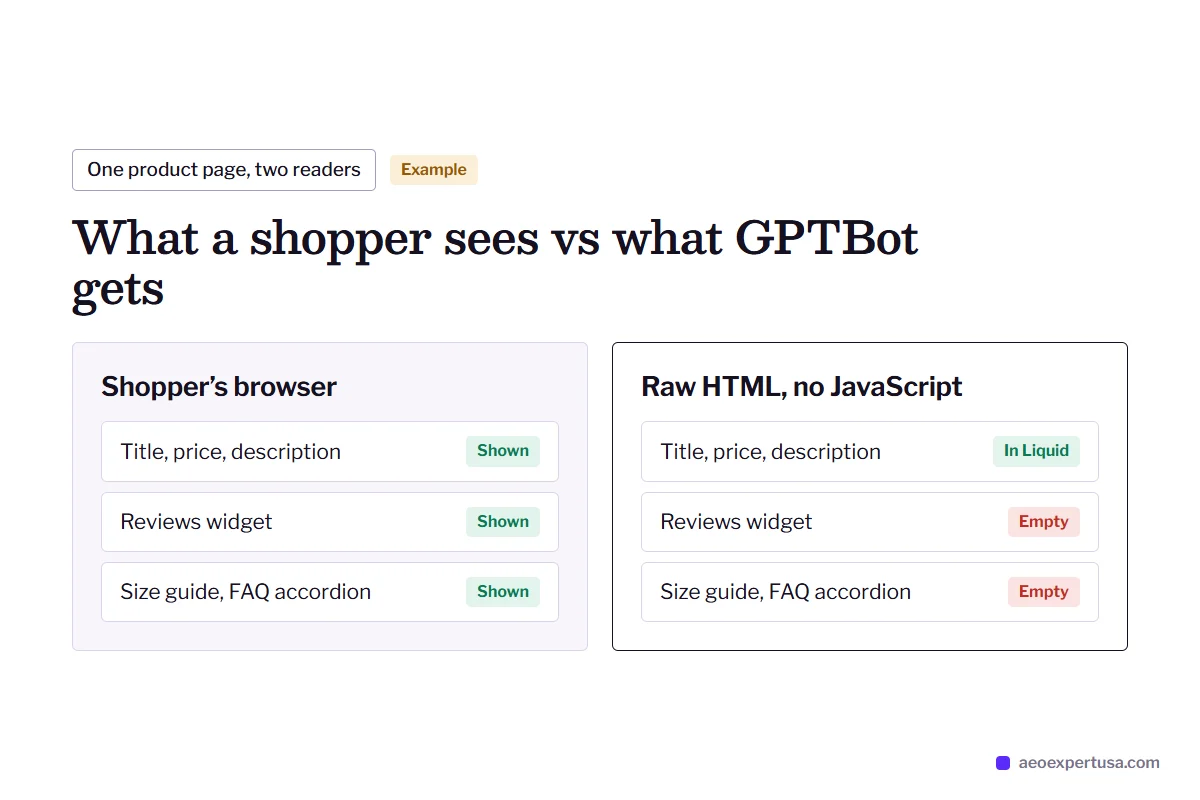
The good news is that Shopify themes render product pages on the server with Liquid, so the core of every page is plain HTML that crawlers can read. The risk is everything bolted on afterwards. Review widgets, size guides, FAQ accordions and bundles often come from apps that load content with JavaScript after the page arrives. Many AI crawlers fetch raw HTML and do not run JavaScript, so for them that content may as well not exist.
This page covers the Shopify side of ecommerce AEO. Every engagement starts with a free AEO audit, and the fixes run on month-to-month terms with the expert who did the audit.

Shopify AEO Expert Checks, Setting by Setting
Where Shopify stores lose AI visibility, and where each fix lives.
robots.txt.liquid
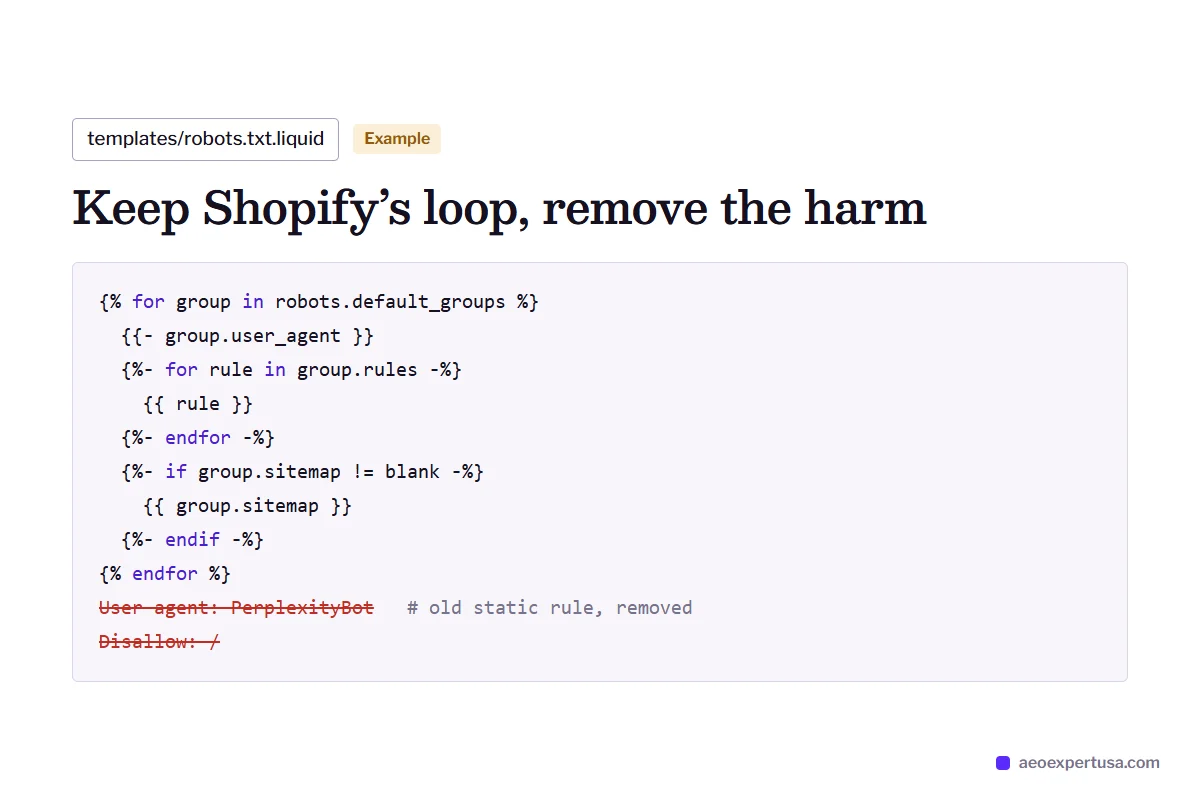
Shopify's default robots.txt does not disallow the main AI crawlers. Changes go in a robots.txt.liquid template, added under Online Store, Themes, Edit code. Shopify recommends adding rules with its Liquid objects so the defaults keep updating; pasting a static file over them is how stores lose those updates.
Sitemap
Shopify builds /sitemap.xml automatically, with child sitemaps for products, collections, pages and blogs. You cannot edit it, but you can keep thin pages out with the seo.hidden metafield and by not publishing empty collections.
Theme JSON-LD
Online Store 2.0 themes such as Dawn print Product JSON-LD through Liquid. The default output is basic and often lacks GTIN, brand detail and ratings. Apps may add a second Product block, and two conflicting blocks help nobody.
App-loaded content
Reviews, Q&A and size charts injected by apps after page load. The fix is an app setting or theme block that renders key content in the HTML, or a short summary written into the product description.
Duplicate product URLs
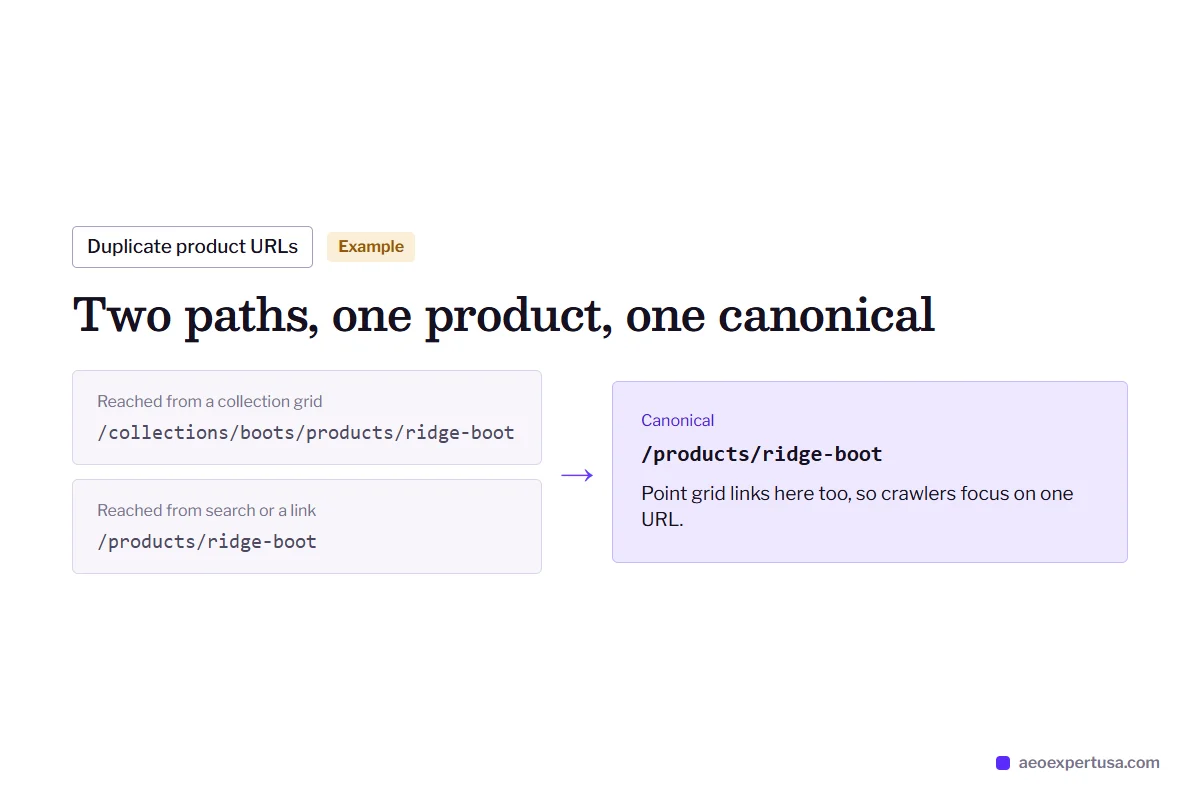
Products can be reached at /collections/name/products/item and /products/item. Shopify's canonical points to /products/, and internal links from collection grids should match it so crawlers focus on one URL per product.
Product data for AI shopping
Shopify is connecting store catalogs to AI shopping experiences, including ChatGPT. Clear titles, variant names, GTINs and policies help there and on your own pages, so the same cleanup pays twice.

Shopify AEO Expert Fix: An Old robots.txt Override
A developer adds a robots.txt.liquid file years ago, pastes in a static rule set and moves on. Shopify's defaults stop updating, and a blanket rule for AI user agents sits there unnoticed. The fix restores Shopify's Liquid loop and removes only the rule that does harm.
- Found by reading the live /robots.txt, not the theme editor
- Fixed inside robots.txt.liquid with Shopify's Liquid objects
- Confirmed with a robots.txt test for each AI user agent

Why Stores Hire a Shopify AEO Expert
A typical Shopify store
- Product descriptions are one marketing paragraph with no specs, sizes or care facts.
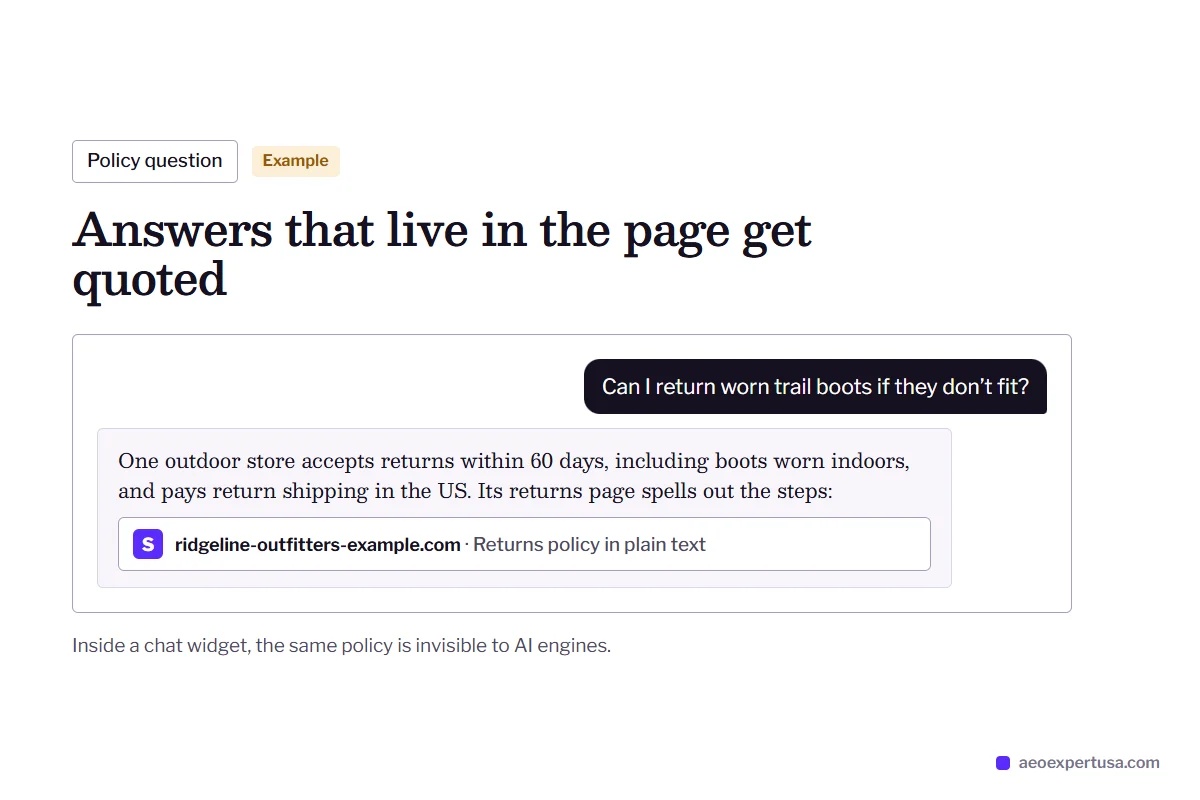
- Shipping, returns and warranty answers live only in a chat widget.
- Collections are image grids with no text explaining who each product is for.
- Reviews load by JavaScript, so AI engines see a product with no social proof.
After Shopify AEO work
- Spec tables and short answers on every key product page, in the HTML.
- Policy pages written as plain answers: how long, how much, which countries.
- Collection intros that answer the buying question each collection serves.
- Review content rendered in the page or summarized in the description.

Shopify AEO and llms.txt
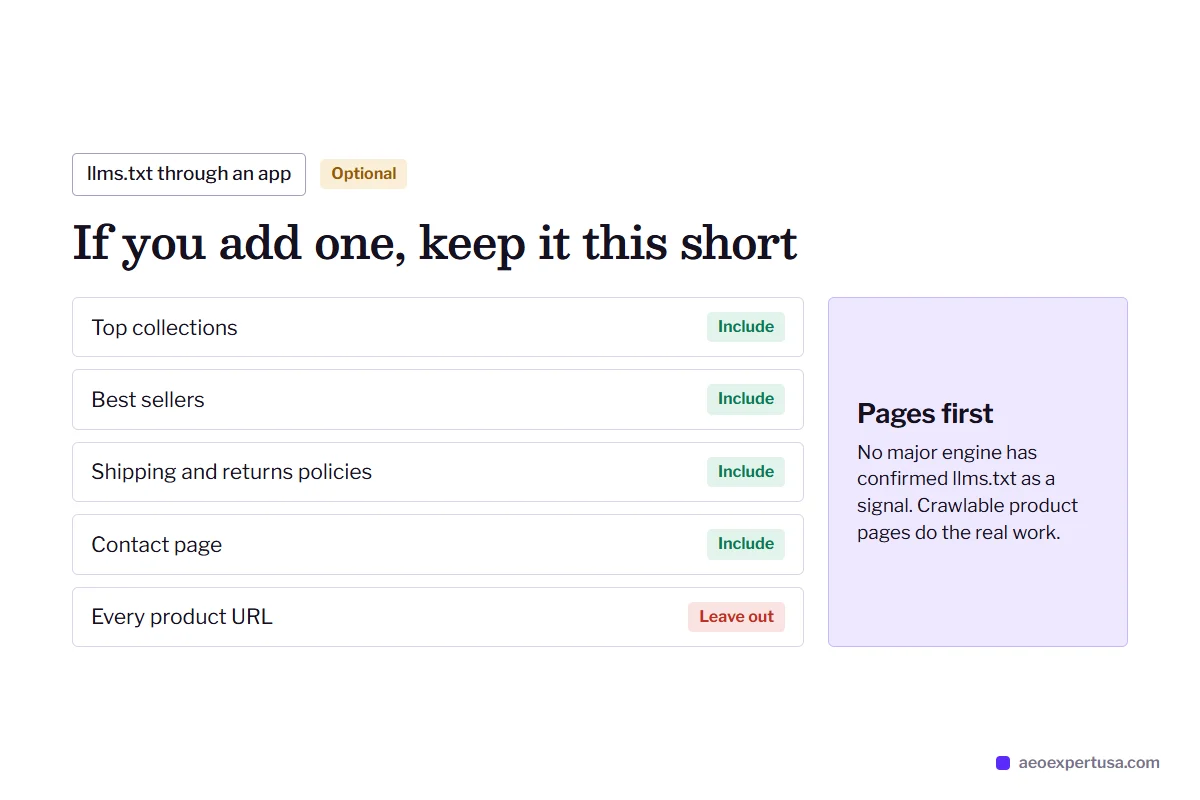
llms.txt is a proposed standard from llmstxt.org that lists your most useful pages in Markdown for language models. No major AI engine has confirmed it as a ranking or citation signal, so treat it as low-cost and optional.
Shopify does not let you upload a plain file to the root of your domain, so stores usually serve llms.txt through an app. If you add one, keep it short: your top collections, best sellers, shipping and returns policies, and contact page. You can draft it with the free llms.txt generator. It never replaces crawlable product pages, which is where the real work is.

How a Shopify AEO Expert Engagement Works
Send your store
5 minutesShare your store URL. If you want fixes made, add a staff account limited to the online store and themes.
Audit
Within 48 hoursrobots.txt, sitemap, theme schema, app-loaded content and Search Console indexing, plus live tests in each AI engine.
Fix
Month to monthTheme edits made on a duplicate theme first and published once checked. Checkout is never touched.
Measure
MonthlyAI referrals from chatgpt.com and perplexity.ai tracked in GA4, and product-question citations re-tested each month.
Shopify AEO Expert FAQs
Can I edit robots.txt on Shopify?
Yes. Create a robots.txt.liquid template in your theme code and add or remove rules with Liquid. Shopify recommends keeping its default rule loop so the file keeps getting platform updates.
Does Shopify block AI crawlers by default?
No. Shopify's default robots.txt does not disallow GPTBot, OAI-SearchBot or PerplexityBot. Blocks usually come from a custom robots.txt.liquid file, an app or a rule a previous developer added, which is why the audit reads the live file.
Do Shopify apps hurt AEO?
Some do. Apps that inject reviews, FAQs or product details with JavaScript can hide that content from AI crawlers that read raw HTML. Apps that add their own Product schema can also duplicate your theme's markup.
How much does it cost to hire a Shopify AEO expert?
It depends on what the free audit finds. You get a fixed quote for the fixes, month-to-month terms and direct work with the expert, with no account managers. See pricing for how engagements are structured.
Will Shopify AEO get my products into ChatGPT shopping answers?
No one can promise that. The work makes your products crawlable, your product data clean and your answers quotable, which are the inputs AI shopping features rely on. It then tracks whether your products start appearing for the questions you care about.
Get a Free Shopify AEO Audit
See what AI crawlers can and cannot read on your store, and the first three fixes to make.
- Delivered in 48 hours
- No app installs needed
- No obligation
Request your free AEO audit
Takes 30 seconds. You get a real audit, not a sales sequence.
Related services and guides
Make AI recommend your business, starting this week
Hire an AEO expert who works from your data, not guesses.