
AI Overviews Optimization With Search Console Tracking
AI Overviews optimization makes your pages eligible, useful and easy to quote for the AI summaries Google shows above its results. Then it tracks the effect with the data Google actually gives you, without pretending there is an AI Overviews filter.
- Indexing and snippet eligibility fixed first
- Pages shaped for the questions Google answers with AI
- Clear tracking in Search Console and GA4
how often should a tankless water heater be flushed
Most manufacturers recommend flushing a tankless water heater once a year...
1clearline-plumbing.exampleMaintenance table quoted
the source AI citesHow AI Overviews Optimization Works
AI Overviews optimization starts from what Google has said in public: there is no special markup or file that gets you into AI Overviews. Google's guidance on AI features says a page must be indexed and eligible to show a snippet in Google Search, and that normal SEO best practices apply. Everything else is about being the most useful source for the question.
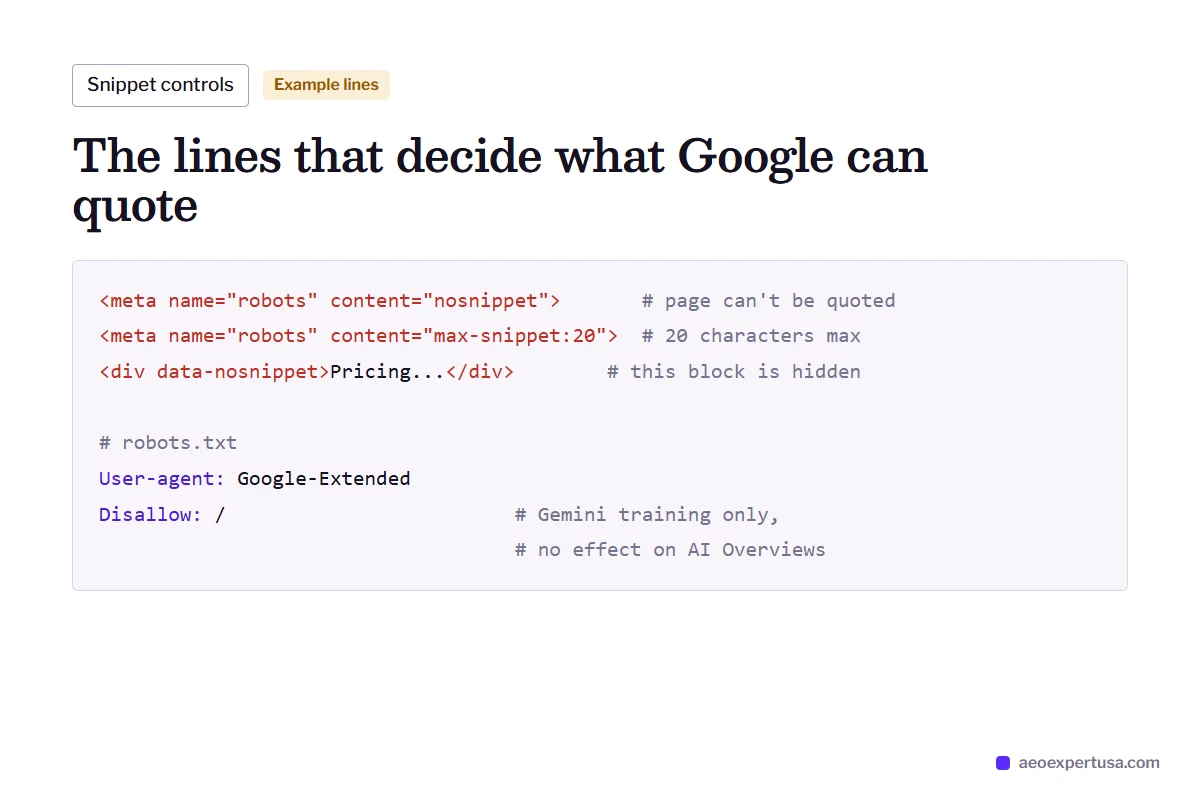
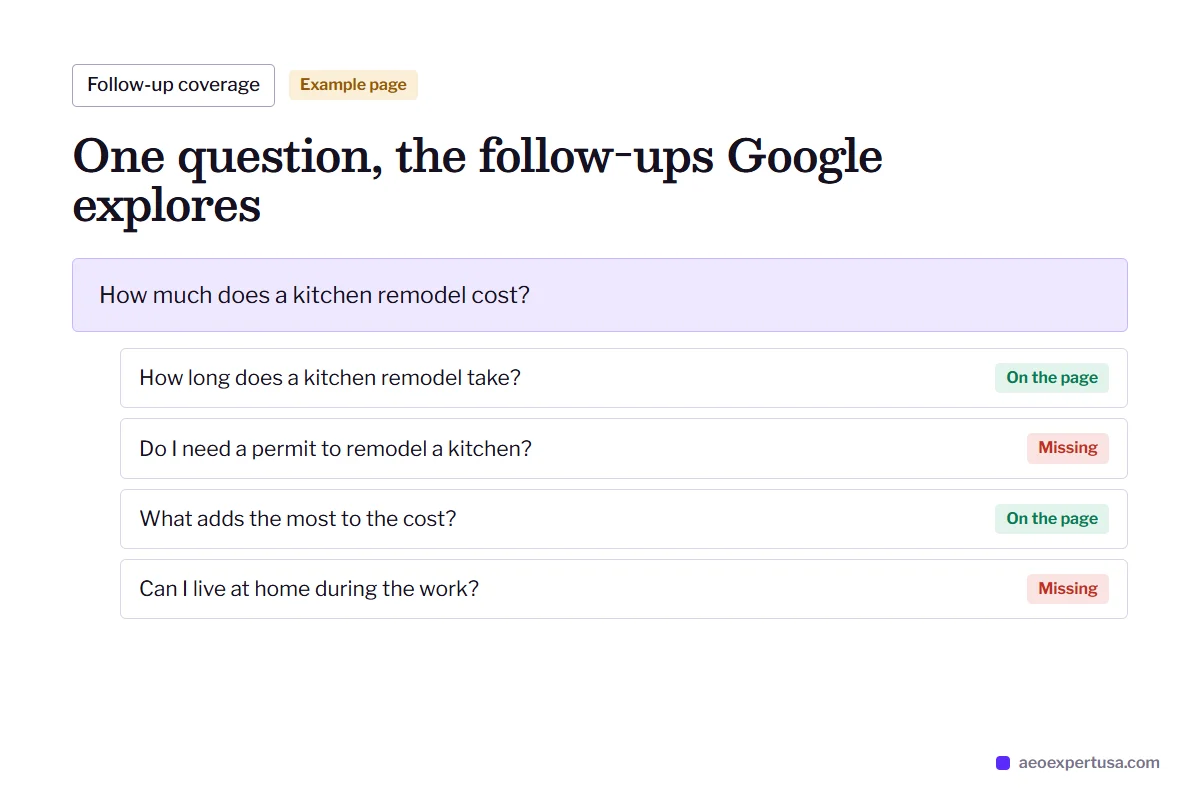
That makes the work concrete. Pages must be crawled and indexed by Googlebot. Snippet controls such as nosnippet, max-snippet and data-nosnippet must not hide the passage you want quoted. The answer must sit in plain text near the top of the page, and the page must cover the follow-up questions Google tends to explore for that query.
One common mistake is worth calling out. The Google-Extended token in robots.txt controls whether your content is used to train Gemini models. It does not remove you from AI Overviews or AI Mode, and allowing it does not get you in. Those features use Googlebot and the normal index.

What a Google AEO Expert Works On
Index coverage
Key pages checked in the Page indexing report and URL Inspection, with exclusions fixed.
Snippet controls
Robots meta tags and data-nosnippet audited, so no template hides your best passage.
Question targeting
The queries that already trigger AI Overviews in your niche, found and matched to pages.
Passage structure
Short answers under question headings, lists for steps and tables for comparisons.
Follow-up coverage
Related questions answered on the same page or one click away, for AI Mode's deeper answers.
Trust signals
Author details, dates, sources and Organization markup that support the facts you state.

Google Search Console AI Overviews Tracking: What You Can and Cannot See
Google Search Console includes AI Overviews and AI Mode in the Performance report, counted as part of the Web search type. There is no separate AI Overviews filter or AI Mode filter, so any tool that claims to pull those numbers straight from Search Console is estimating.
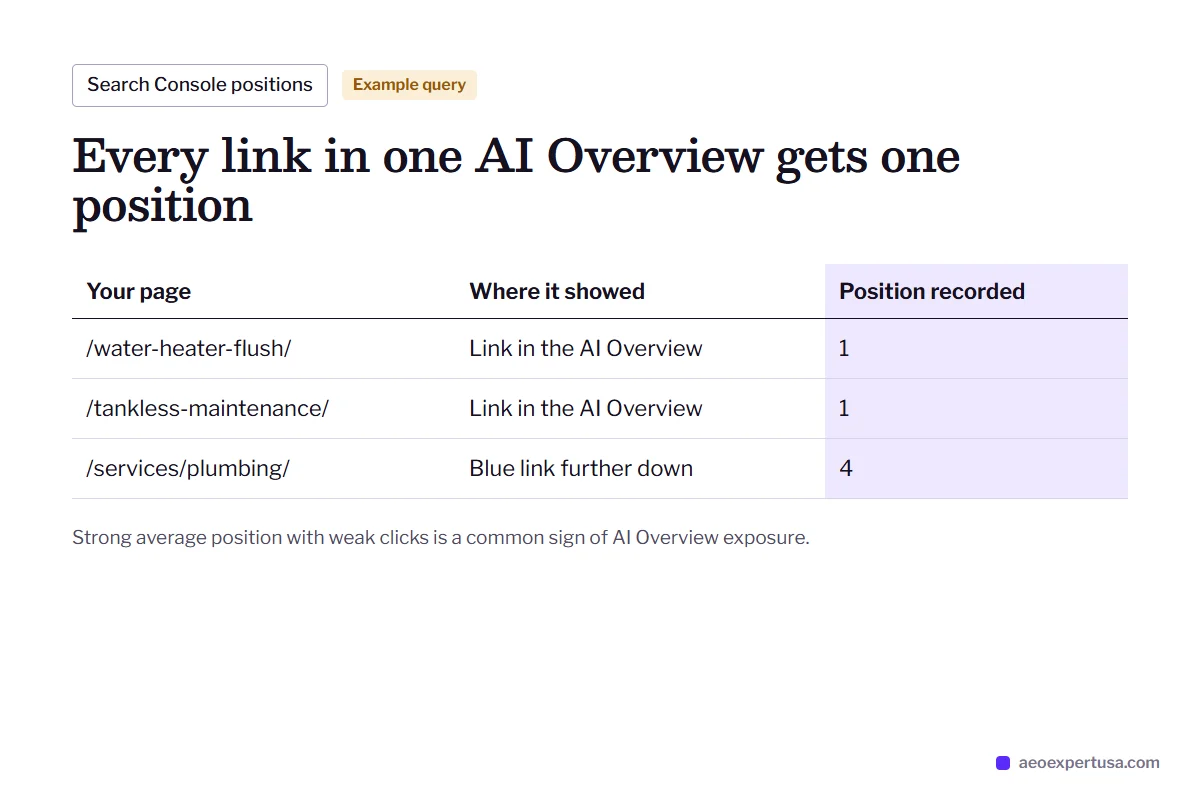
A few rules from Google's documentation help you read the data. A link shown inside an AI Overview counts as an impression for that page. All links in one AI Overview share a single position, the position of the AI Overview block itself, which is why pages can show strong average positions with weak clicks. Clicks from AI features are counted as clicks, like any other result.
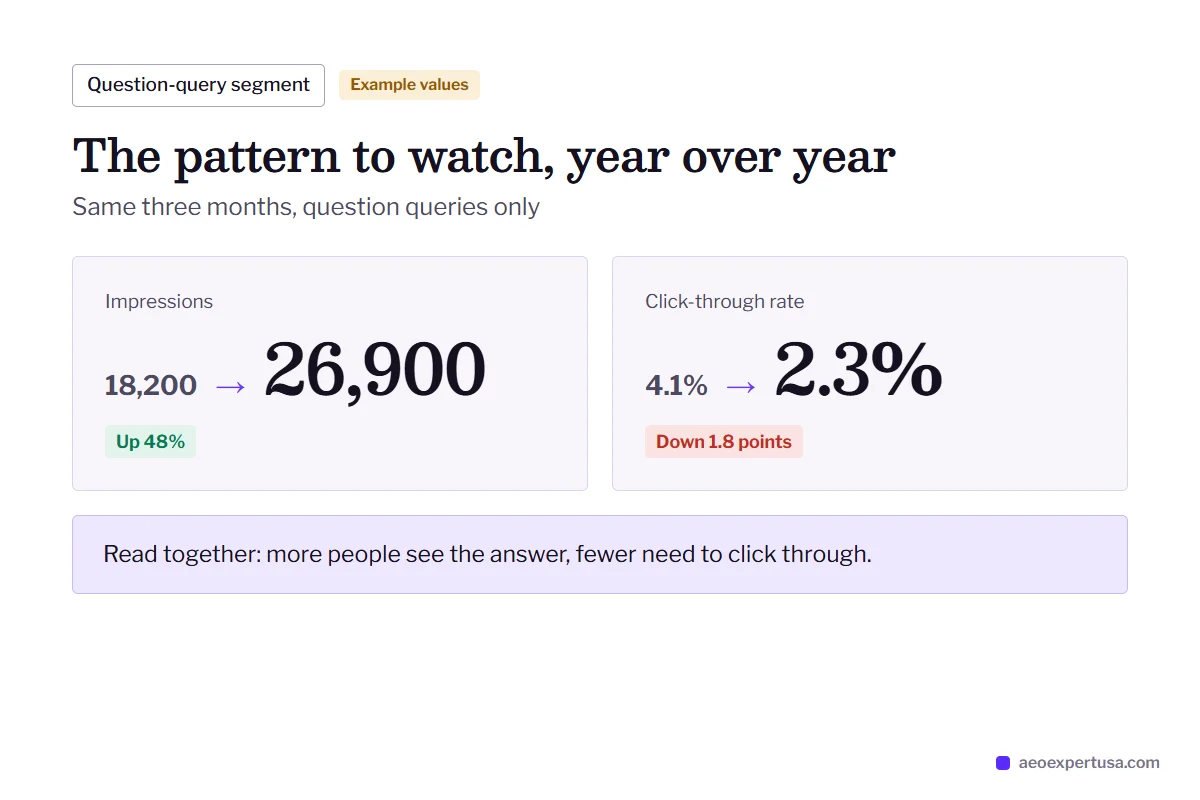
So Search Console for AI Overviews monitoring works by pattern, not by label. Watch question-style queries, and compare clicks per impression before and after AI Overviews appeared for them. Back that up with saved screenshots of the live results for your most important queries.

How to Track AI Mode in Google Search Console
You cannot isolate AI Mode, but you can isolate the kinds of queries it handles best. A regex filter on question-style queries gives you a segment to trend month over month, and the Pages tab shows which URLs earn impressions from it.
- Performance report, Web search type, Query filter set to Custom (regex)
- Compare the last 3 months with the same period a year earlier
- Watch impressions rising while CTR falls: a typical AI answer pattern

Search Console vs Google Analytics for AI Overviews Monitoring
Why a Google Analytics AEO expert and a Search Console expert answer different questions.

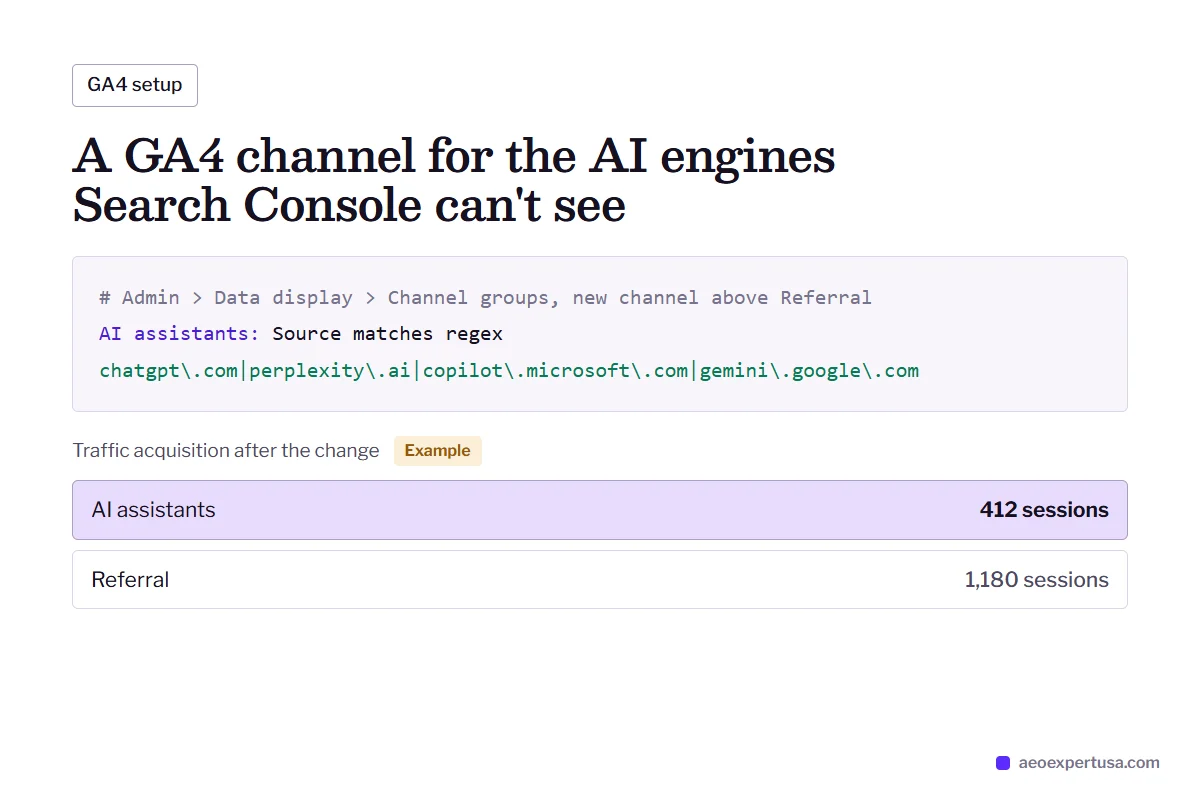
How to Hire a Google AEO Expert for AI Overviews
Share access
Day 1Read access to Search Console and GA4, plus your list of priority topics.
Baseline
Week 1Queries that trigger AI Overviews found, your current presence recorded, and indexing gaps listed.
Fix and rewrite
Weeks 2 to 8Indexing and snippet issues fixed, then priority pages restructured answer-first.
Track
MonthlyQuestion-query segments, page trends and saved result checks reported monthly.
AI Overviews Optimization FAQs
Is there an AI Overviews report in Search Console?
No. AI Overviews and AI Mode data are included in the Performance report under the Web search type, with no filter to separate them. You can track them indirectly through question-query segments and page-level trends.
Does structured data get me into AI Overviews?
Not on its own. Google says no special schema is required for AI features. Structured data still helps Google understand entities and products, so it is worth having, but it is not a switch.
Will blocking Google-Extended remove me from AI Overviews?
No. Google-Extended only controls whether your content is used to train Gemini models. AI Overviews and AI Mode use Googlebot and the normal index, so you control them with the same rules as regular search.
Why did my clicks drop while impressions rose?
That pattern often appears when an AI Overview starts showing for your queries and answers the question on the results page. Check which queries changed first; a traffic drop review can separate AI effects from updates and indexing problems.
Can I stop Google quoting my page in AI Overviews?
Yes, with snippet controls such as nosnippet or data-nosnippet on specific passages. These also limit regular snippets, so use them only on content you truly want kept out.
Get a Free AI Overviews Optimization Audit
See which of your queries trigger AI Overviews, whether you are linked in them, and what blocks you where you are not.
- Delivered in 48 hours
- Search Console read access recommended
- No obligation
Request your free AEO audit
Takes 30 seconds. You get a real audit, not a sales sequence.
Make AI recommend your business, starting this week
Hire an AEO expert who works from your data, not guesses.